The Table Reference Service (TRS) stores selections for table-driven fields and Uniform Data Codes (UDC). Some table fields are system-defined. Others are user-defined.
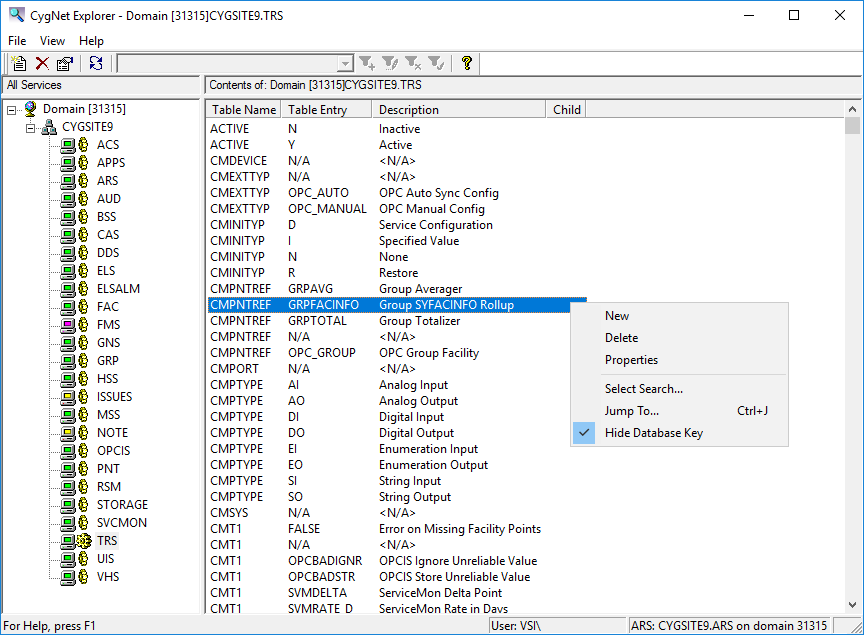
Click the following image to see an example Table Reference Service:
Table and table entry configuration is made in the TRS Editor, or the Properties for Entry <entry> in Table <table> dialog box.
The following table lists and describes the context menu options that display when you right-click in the TRS service pane.
| Option | Description | Shortcut |
|---|---|---|
|
New |
Click this option to create a new table entry. |
|
|
Delete |
Highlight an existing record and click this option to permanently delete a table record. |
|
|
Properties |
Highlight an existing record and click this option to view its properties in read mode. You can also just double-click an existing record. |
|
|
Select Search |
||
|
Jump To |
Ctrl+J |
|
|
Hide Database Key |
Click to Hide/Display the column in the service pane containing Data key values for each record. |
More:
 TRS Configuration File Keywords
TRS Scripting
|
|
|

